ProTeams captures a lot of operational data as your team works. Reports are how you turn that data into something useful — compliance summaries for client meetings, attendance records for payroll, issue trends for operational reviews.
Overview
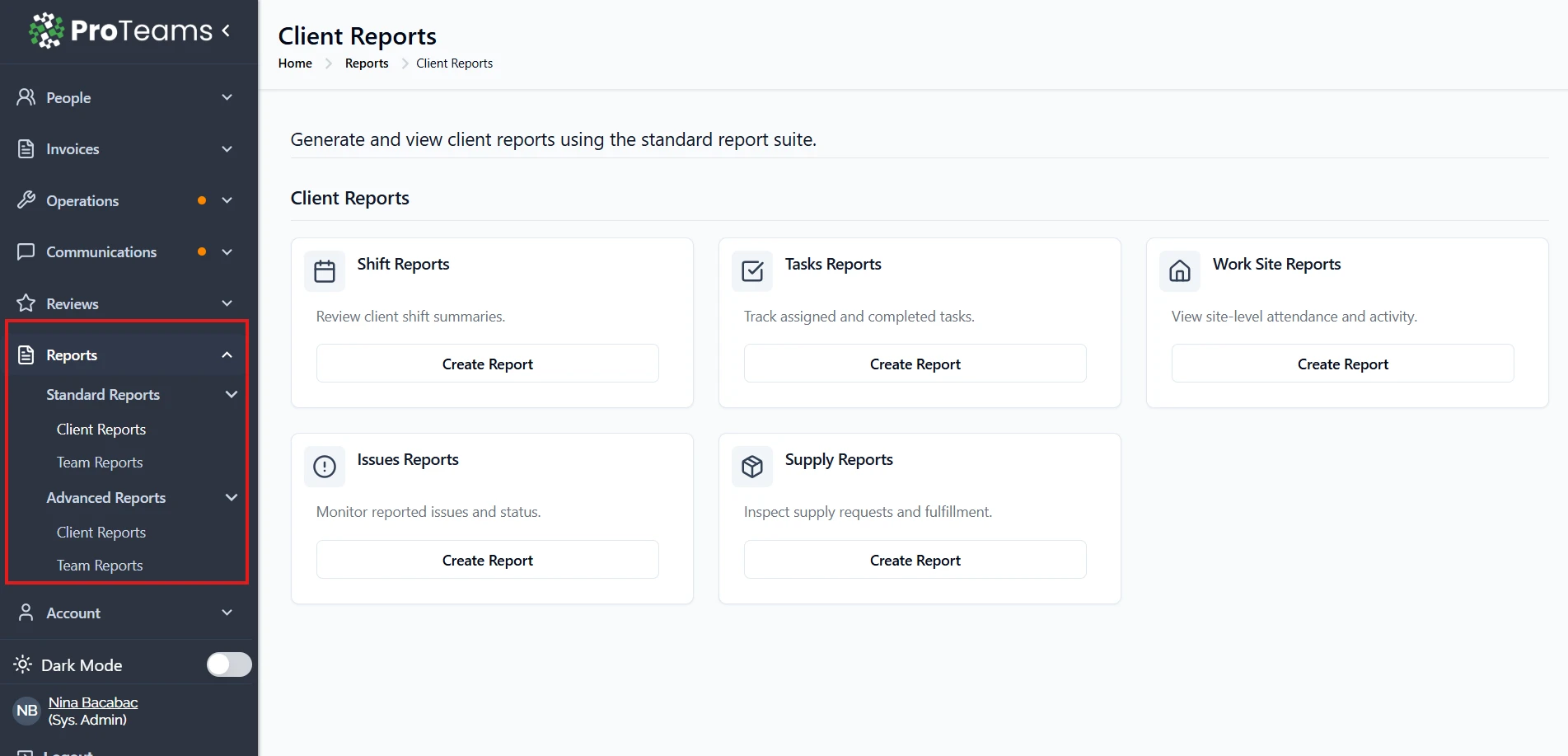
ProTeams makes it easy to access reports so you can track performance, activity, and key data across your team and clients. All reports are available from the main navigation menu.
Steps to Access Reports
- Go to the left-hand menu
- Click on Reports
- Select one of the following options:
- Standard Reports – Basic reporting options
- Advanced Reports – More detailed and customizable reports
Accessing Specific Report Types
After opening the Reports section, you can choose the type of report you need:
- Client Reports View reports related to client activities, appointments, and services
- Team Reports Track employee attendance, performance, and task activity
What You’ll See Next
Once you select a report category:
- A list of available reports will appear
- Click Create or Create Report next to the report you want
- Follow the prompts to generate your report
Tips
- If you don’t see certain reports, your access may be limited by your role
- Advanced Reports provide more detailed insights compared to Standard Reports
Tip
No data in your results usually means your date range or filters are too narrow. Start broad and narrow down once you can see data.